By Rodney Howard May 13, 2026
If you run a service business, you already know that how your clients pay matters just as much as what they’re paying for. A clunky checkout process costs you sales. A smooth, trusted payment experience builds loyalty. That’s exactly why Apple Pay has become one of the most important tools in a modern service business’s payment stack. But here’s what most guides get wrong — they treat Apple Pay as a single feature, when it’s actually three distinct acceptance methods, each designed for a different context. Understanding Apple Pay setup for merchants and which feature fits your business can be the difference between a forgettable transaction and a frictionless one.
What Makes Apple Pay Different for Service Businesses
Apple Pay is a digital wallet that lets customers pay using their iPhone, Apple Watch, Mac, or iPad. It authenticates payments through Face ID, Touch ID, or a passcode. It never shares the customer’s actual card number with merchants. That last part is important. For service businesses, which often store client data and maintain ongoing relationships, Apple Pay adds a genuine layer of trust.
There are tangible operational advantages beyond added security. Research from the Baymard Institute shows that the primary factor in customer abandonment is checkout friction. Apple Pay largely eliminates friction. Purchasers are no longer required to fill out forms, enter numbers, or do anything other than touch the biometric reader to complete the contactless payment. For a law firm, a spa, a cleaning company, a personal trainer, or a business where a client relationship is personal, that becomes a smooth payment experience.
The Three Ways to Accept Apple Pay
Mobile (Tap to Pay)
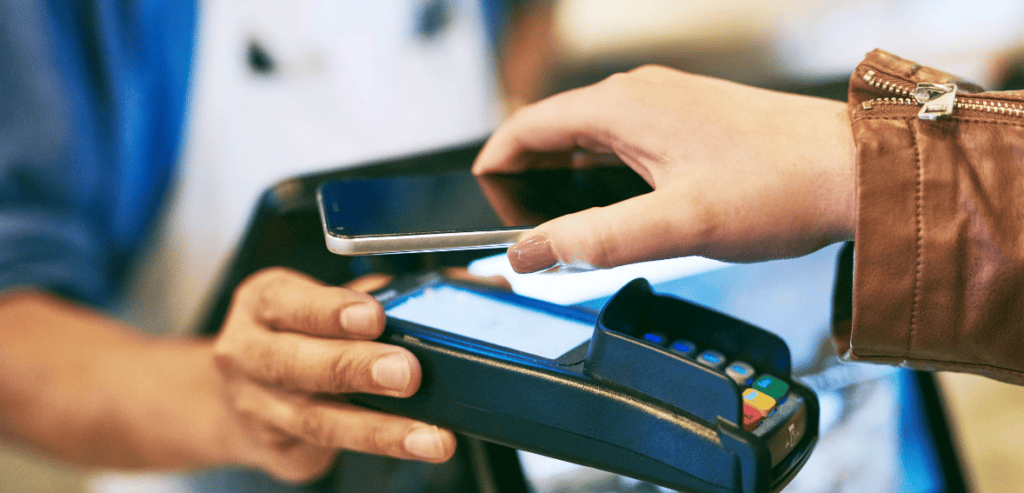
Mobile acceptance is exactly what it sounds like — a customer taps their device to yours to complete a payment. With Tap to Pay on iPhone, service businesses can accept Apple Pay without any card reader hardware. Your iPhone becomes the terminal. This is ideal for mobile service providers who visit clients rather than the other way around.
Consider the dog groomer who works out of a van, the personal trainer who uses a client’s home gym, or a housecleaning team. None of these professional operations needs a counter or a register. What they need is a fast, professional way to get paid where the work is performed. With a payment app enabled, they present the iPhone, the client taps, and the payment is processed. Adding Apple Pay for merchants in these situations is quick and easy. All it takes is an app like Square or Stripe, and an enabled Tap to Pay, and they are in business.
In-App Payments
If your service business has a mobile app, or if you’re working with a developer to build one, Apple Pay in-app acceptance is one of the most powerful upgrades you can make. In-app Apple Pay lets customers book and pay without ever leaving the app experience. No redirects, no external checkout page, no handoffs that break the user flow.
This matters enormously in service industries where apps are used for scheduling, booking, and client management. A yoga studio app, a home services booking platform, and a massage therapy scheduler — all of these benefit from Apple Pay integration at the payment step. Research from Apple’s developer documentation confirms that integrating Apple Pay into native apps consistently reduces checkout abandonment compared to manual card-entry flows. The customer’s payment details are already stored securely in their Wallet. The transaction requires only a biometric confirmation.
For developers or business owners working with a dev team, integrating Apple Pay in-app requires using Apple’s PassKit framework and going through Apple’s approval process. It’s not a weekend project, but for businesses with an established app audience, the return on investment is clear. Fewer drop-offs at checkout means more completed bookings and more revenue.
Online (Web-Based) Payments

The third method is accepting Apple Pay on your website. If you accept Apple Pay online, you’re giving Safari users on any Apple device a one-tap checkout experience directly on your website — without needing an app at all.
This is considered the highest-impact application for most service-based industries. The majority of clients’ first encounters are through their websites. When clients land on a booking, service, or event page, they are redirected to a payment page. When they encounter the Apple Pay button, their frame of reference is frictionless payment. This results in a lower-friction, higher-trust payment framework. Having the Apple Pay button on a payment page indicates that the service a client is using is more modern and established. Having the Apple Pay button also tells the client that they do not have to dig through the drawers of their furniture or through desktop drawers to find their payment method, a credit card.
To accept Apple Pay online, you have two main paths. The first is using a payment processor that handles everything — Stripe, Square, Shopify Payments, and Braintree all support Apple Pay with minimal setup. The second path is direct integration through Apple’s JavaScript API, which gives you more control but requires technical expertise. For most service businesses, going through a processor is the faster, simpler choice. Stripe, for example, automatically enables Apple Pay on eligible accounts once the required domain verification steps are completed.
Apple Pay Setup for Merchants: What You Actually Need
Getting Started with Apple Pay
The requirements for Apple Pay setup for merchants vary depending on the acceptance method you’re pursuing, but the fundamentals remain the same. You need a payment processor that supports Apple Pay. You need to verify your business domain if you accept online payments. And you need to go through Apple’s merchant agreement, which is automatically included when you set up with a supported processor.
To have Tap to Pay on iPhone services, you can use any iPhone XS or higher model. This requires iOS 16 or later, a compatible processor, and a payment app. PayApps from both Square and Stripe can serve this purpose. No additional hardware is necessary. Apple Pay for in-app payments requires integration with iOS 16. For this Apple PassKit integration, you will have to verify your domain and register your Apple merchant ID on Apple’s Developer portal.
Empowered with Apple Pay, your web payment services will require you to verify your domain at the very least. To ease this process, Stripe offers a domain association file service in their documentation. Once you have the file on your domain in the correct directory, the domain verification should complete. Depending on your level of experience, this process can take around 15 minutes.
Choosing the Right Method for Your Service Business

Not every service business needs all three. The right choice depends on how your clients interact with you and where payments happen in your workflow.
Tap to Pay should be the priority for a mobile-first service that offers a personal styling consultation, an in-home massage, or mobile auto detailing. The whole service is delivered in person and on the go. Services that heavily depend on their apps, such as fitness studio or full home management apps, should integrate Apple Pay into their apps. The app is the main service, and the payment should equal that quality. A service business that books clients primarily through its website, such as management consultants, interior designers, or copywriters, has the highest need for Apple Pay on its site. That is the first point of the journey and typically the conversion point.
Many service businesses will benefit from all three over time, especially as they grow. A boutique spa, for instance, might start by accepting online payments for package purchases, add Tap to Pay for retail product sales at the front desk, and eventually integrate in-app payments if they build a client-facing scheduling app.
Why Apple Pay Trust Signals Matter
The Security Advantage
One thing that separates Apple Pay from standard card processing is tokenization. When a customer pays using Apple Pay, a unique device account number is generated for that transaction. The merchant never sees the customer’s actual card number. This makes Apple Pay one of the most secure payment methods available.
For service businesses in sensitive industries such as healthcare, legal, or therapy, privacy and security are especially notable differentiators. For more privacy-conscious clients, Apple Pay tends to improve customers’ willingness to pay. Apple, as an emblem of reliability, can influence clients’ payment completion. Studies conducted by NielsenIQ also indicate that consumer confidence in the payment method offered can directly affect purchase completion rates.
The Business Case for Acting Now
Apple Pay adoption among iPhone users in the US has crossed 70% penetration, and the upward trend in contactless payment preference isn’t reversing. Service businesses that haven’t yet integrated Apple Pay are leaving a measurable portion of their potential revenue on the table. Customers who encounter friction — especially when they’re already committed to buying — will sometimes walk away. That’s a loss that’s hard to see in your analytics but very real in your bottom line.
The cost of not setting this up is greater than the cost of setting it up. For most service businesses, getting started with online Apple Pay acceptance takes a single afternoon and no new hardware. The return starts the moment your first client taps to pay.
Conclusion
Apple Pay for service businesses isn’t a luxury feature — it’s fast becoming a baseline expectation among modern clients. Whether you’re accepting payments in the field, inside a mobile app, or through your website, there’s a version of Apple Pay designed for exactly that workflow. The key is matching the right method to the right moment in your client experience.
Start with wherever your clients are most likely to convert. Optimize from there. The combination of trust, speed, and security that Apple Pay delivers is one of the simplest upgrades a service business can make — and one of the most impactful.
Frequently Asked Questions
Does Apple Pay work for service businesses that don’t have a physical location?
Yes. Tap to Pay on iPhone is built specifically for mobile and field-based service providers. You accept payments directly through your iPhone — no card reader or fixed location required. It works wherever you and your client are.
How long does it take for Apple Pay to set up for merchants?
For online acceptance through a payment processor like Stripe or Square, setup can take as little as a few hours, including domain verification. For in-app integration, the timeline depends on your development resources — typically a few days to a few weeks, depending on complexity.
Is Apple Pay only available to customers with iPhones?
Apple Pay works across iPhone, Apple Watch, iPad, and Mac. Online, it’s available to any Safari user on an Apple device. It does not work in non-Apple browsers like Chrome, which is why most businesses pair Apple Pay with a fallback option such as card entry or Google Pay.
Are there extra fees for accepting Apple Pay?
Apple does not charge merchants any additional fees for accepting Apple Pay. You pay your standard processor transaction fee, the same as any card payment. There’s no Apple Pay surcharge or setup fee from Apple’s side.